the PTI labeling software buyer’s guide
PTI Labeling Software: A Buyer's Guide for Produce Packers and Growers
Shopping for PTI labeling software? Here's what actually matters - and what to watch out for.
When you start searching for PTI labeling software, you'll run into a few distinct categories of tools - and most of them weren't built for produce.
Generic label design software like BarTender and Teklynx CODESOFT can technically produce a PTI-compliant label. They're powerful tools used across dozens of industries. But they're label design platforms, not produce operations platforms. The difference matters more than most people realize until they're in the middle of a busy pack day and something breaks.
On the other end, full ERP platforms like Famous Software or Reserva ERP include PTI labeling as one module among dozens. They're built for large operations with IT staff and implementation budgets measured in months. If you're a small-to-mid-size packer or grower, you'll pay for a lot of features you'll never use - and spend weeks getting set up before you print your first label.
In between is where most operations actually live: you need software that handles PTI labeling correctly, ties to your orders and lot tracking, integrates with the retailers you ship to, and doesn't require a consultant to configure. This guide helps you figure out what you actually need and what questions to ask before you buy.
✅ What Any PTI Labeling Software Must Do
Before you evaluate anything else, make sure every option on your list handles these basics without exception:
Correct GS1-128 Barcode Generation
The barcode must use the GS1-128 symbology specifically - not standard Code 128, not Code 39. It must encode your GTIN with Application Identifier 01, lot number with AI 10, and pack date with AI 11 or 13.
Automatic Voice Pick Code Calculation
The voice pick code is a CRC16 hash of your GTIN, lot number, and pack date. It must be calculated correctly every time, automatically. Any software that requires you to enter the voice pick code manually is one human error away from a compliance failure.
GTIN-14 Format
PTI labels use 14-digit GTINs. Some generic label tools default to 12-digit GTIN-12 (UPC) format. Make sure the software produces the 14-digit version required for case-level PTI labels.
Pallet Label (SSCC) Support
If you ship to any major retailer, you'll need pallet-level labels with SSCC barcodes. Confirm pallet label generation is included, not a paid add-on.
Print Record Keeping
Every label printed should be logged - what was printed, when, for which order, with which lot number and GTIN. This is what makes a mock recall trace possible in minutes rather than days.
📦 Four Types of PTI Software - And Who Each One Is Right For
1. Generic Label Design Software
BarTender, Teklynx CODESOFT
What it is: Desktop software designed for creating label templates. You design a label layout, connect it to a data source, and print.
What it does well: Extremely flexible. You can design virtually any label format. Works with almost any thermal printer. Used by large manufacturers across many industries.
Best for: Large operations with IT staff and existing label infrastructure. Not ideal for: Small-to-mid-size growers and packers who want to be up and running quickly.
2. Full ERP Platforms with PTI Modules
Famous Software, Reserva ERP
What it is: Enterprise software that manages the entire produce operation - inventory, orders, shipping, financials - with PTI labeling as one component.
What it does well: If you need a complete operations platform, the integration between labeling, inventory, and order management is seamless. Everything lives in one system.
Best for: Large, established packing houses that need a full operational overhaul. Not ideal for: Growers and small-to-mid-size packers who need to get compliant now without a six-month implementation.
3. Standalone Online PTI Label Generators
Various web-based tools
What it is: Web-based tools that let you enter GTIN, lot, and date information and generate a printable PTI label on the spot.
What it does well: Zero setup. You can generate a compliant label in minutes with no software to install.
Best for: Very small operations doing minimal volume with a single retailer. Not ideal for: Any operation that ships regularly to major retailers or needs audit-ready records.
4. Purpose-Built Produce Labeling Platforms ⭐
Built specifically for produce operations
What it is: Software designed specifically for the produce industry - handling orders, lots, PTI case labels, pallet labels, and retailer integrations in one place.
What it does well: Everything a produce operation actually needs is already built in. No template design required. No custom integration projects. The workflow matches how a packing house actually operates: you receive an order, you pack a lot, you print labels, you ship.
What it doesn't do well: Less flexible than enterprise platforms for highly custom requirements. Not the right fit if you need a full ERP with financials, HR, and fleet management.
Best for: Small-to-mid-size growers and packers who ship to major retailers, need to be compliant quickly, and want software that grows with them without requiring a re-implementation.
🔍 The Features That Separate Good PTI Software from the Rest
Once you've narrowed to purpose-built options, here's what to dig into:
Retailer Integration - This Is the Big One
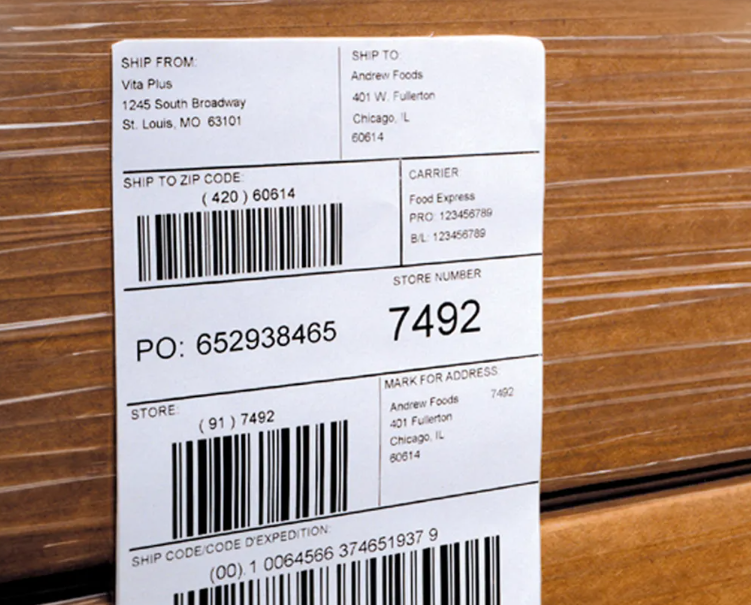
Standard PTI compliance gets you in the door. But the retailers you care about have requirements beyond standard PTI - and your software needs to handle them without manual workarounds.
📋 Ask Specifically:
• Can it handle a FSMA audit for traceability?
• Does it support Costco's pallet label and SSCC requirements?
• Can it handle buyer-specific label field requirements (harvest region, private label GTINs, etc.)?
Order-Driven Labeling vs. Manual Entry
The best produce labeling software ties every label to an order. You pull up a purchase order, and the system knows the commodity, GTIN, buyer, and destination. You enter the lot and pack date, and the label is ready. No re-typing GTIN numbers. No looking up voice pick codes. No chance of printing a Costco label on a Walmart order.
Manual entry means manual errors. For a mock recall, order-driven records mean you can pull everything tied to a lot number in seconds.
Lot Tracking and Audit Trail
When a retailer calls about a traceability issue, you need to know: which orders contained this lot, how many cases were printed, and where they shipped. Your software should make that a two-minute exercise, not a spreadsheet hunt.
Pricing Model - Usage-Based vs. Flat Fee
PTI software pricing comes in two main structures:
💲 Usage-Based Pricing
Charges based on how many labels you print annually. Better for smaller operations with predictable volume.
📅 Flat Subscription
Monthly or annual fee regardless of volume. Better for operations that scale up significantly during peak season.
Make sure the pricing model matches your volume pattern. A flat-fee tool that's cheap at low volume can become expensive fast. A usage-based tool that looks affordable can add up during heavy pack seasons.
❓ Questions to Ask Every Vendor Before You Buy
1. Does your software calculate the voice pick code automatically, or do I enter it manually?
2. Does it integrate with Costco's supplier portal?
3. Can I print both case labels and pallet labels (with SSCC) from the same system?
4. What thermal printer brands are supported?
5. Where are my print records stored, and how do I pull them for a recall trace?
6. How long does setup take? Do I need IT support to get started?
7. What does support look like if I have a label fail at receiving on a Friday afternoon?
8. Is there a free trial?
The answers will tell you everything you need to know about whether the software was actually built for produce or just adapted from something else.
🚩 Red Flags to Watch For
Voice Pick Code Requires Manual Entry
This is a non-starter. It will be wrong eventually, and a wrong voice pick code at a Costco depot is a problem you don't want.
No Pallet Label / SSCC Support
Major retailers require pallet labels. If it's not included, you're going to need a second tool.
No Record of What Was Printed
If you can't look up every label by lot number, you can't complete a recall trace. This is a food safety requirement, not a nice-to-have.
Long Implementation Timelines
You shouldn't need weeks to get your first compliant label out the door. Purpose-built tools get you printing in minutes.
No Free Trial
You're making an operational decision. Test it first.
📊 Quick Comparison Summary
🌱 How AgTag USA Fits This Picture
AgTag USA is purpose-built PTI labeling software for produce packers and growers. It handles the full workflow - from order receipt through case label and pallet label printing - with built-in integrations for many retailers like Costco and Aldi.
Every label is generated automatically from order data: GTIN, lot, pack date, and voice pick code are all populated without manual entry. Every label printed is logged against the order that generated it, giving you an audit-ready trail for recall traces. Pricing is usage-based, so small operations don't pay for volume they don't have.
Setup takes minutes, not weeks. There's no template design, no IT project, and no integration consultant required. You enter your GTINs once, connect to your orders, and print.
Try AgTag USA Free for 7 Days
No credit card required. Start printing compliant PTI labels today.
Start Your Free Trial →❓ Frequently Asked Questions
Can I use Excel or Google Sheets to print PTI labels?
Some very small operations use spreadsheet-based templates with barcode fonts. It's technically possible for extremely low volume, but there's no audit trail, no voice pick code validation, and no way to scale. One wrong formula means a non-compliant label - and you won't know until it fails at receiving.
Is BarTender or Teklynx a good choice for produce?
They're solid label design platforms used across many industries. For produce, the issue is that they require significant configuration to replicate what purpose-built tools do out of the box. If you have IT resources and existing infrastructure built around those platforms, staying with them makes sense. If you're starting from scratch, purpose-built produce software is faster and simpler.
What printer do I need?
Zebra thermal label printers are the industry standard in produce. Most PTI labeling software supports Zebra natively. Common models for packing house use include the ZT Series (industrial) and ZD Series (desktop/light commercial). Label size is typically 4"x2" for case labels and 4"x6" for pallet labels.
To see an Equipment Guide specifically vetted for AgTag, read our helpful list.
How long should setup realistically take?
With purpose-built software, you should be printing test labels the same day you sign up. Realistic full production setup - GTINs entered, printers configured, first real order printed - is typically one hour.
What if I ship to multiple retailers with different requirements?
Your software needs to handle per-buyer label configurations. Different retailers may have specific field requirements, date formats, or label sizes. Confirm with any vendor that multiple buyer profiles are supported.